


It has come to our attention that the government under the leadership of PM Modi is making strides toward digitizing India. This shift towards digitization has brought about an increased level of transparency as all services are now being offered digitally to the general public. In line with this, the Tamil Nadu State Government has taken a significant step by introducing the TNPDS Smart Ration Card 2025. This ration card is now available in digital format and its application status can be checked online through the tnpds.gov.in website.
The TNPDS Smart Card 2025 allows you to access all the benefits of a state government-issued free ration card. With this card, you can conveniently download the TNPDS Smart Ration Card, check the status of your TNEPDS Ration Card Application for the year 2025, and more. The government initiated this digitalization program in 2021, and in this write-up, you will find all the essential details regarding the TNPDS Ration Card for the year 2025.
TNPDS Smart Ration Card: the government digital ration card process has went begun, TNPDS Smart Ration Card applications are also going through the line. Today we will tell you the procedure of how to apply for a Smart Ration Card Online in the state of Tamil Nadu, as well as we will also give you information about how to watch Smart Ration Card Status Online.
If you are also a ration cardholder in the state of Tamil Nadu, then read this article till the end so that you can get information about TNPDS Smart Ration card.

READ THIS POST IN HINDI
TAMIL NADU DIGITAL RATION CARD, SMART RATION CARD TAMIL NADU
Four types of digital ration cards are provided to the residents of the state by the Government of Tamil Nadu. The types of ration cards offered in Tamil Nadu are given below.
- ➡️ AAY (Antyodaya Anna Yojana) – Yellow Card for the poorest of poor families.
- ➡️ PHH (Priority Household) – Pink Card for Below Poverty Line (BPL) families.
- ➡️ NPHH (Non-Priority Household) – Blue Card for Above Poverty Line (APL) families.
- ➡️ NFS (Non-NFSA) – White Card for families not covered under NFSA.
PDS BENEFITS PROVIDED UNDER TNPDS SCHEME
The Tamil Nadu state government provides regular food security benefits to ration card holders under the National Food Security Act (NFSA). Eligible families receive subsidized rice, sugar, oil, and other essential commodities through the Public Distribution System (PDS). The government also provides Direct Benefit Transfer (DBT) for subsidies and other financial assistance to eligible beneficiaries.
During the COVID-19 pandemic, a one-time relief of ₹1000 was provided to ration cardholders as emergency assistance. Currently, regular monthly PDS benefits continue for all eligible families as per NFSA guidelines.
Note: – To avail all these benefits, you have to convert your ration card to Digital ration card (TNPDS Smart Ration card). Next, we will tell you the process of how to apply for Digital ration card (Smart Ration Card Application Process).
TAMIL NADU TNPDS SMART CARD HIGHLIGHTS
| 🔥 Name of scheme | 🔥 Tamil Nadu Ration Card |
| 🔥 Launch Year | 🔥 2021 (ongoing) |
| 🔥 Total Cards | 🔥 1,17,09,090 (AAY: 18,66,027, PHH: 98,43,063) |
| 🔥 Beneficiary | 🔥 Every single ration card holder in Tamil Nadu |
| 🔥 Official website | 🔥 https://www.tnpds.gov.in/ |
| 🔥 An objective | 🔥 Ration card access to all the needy |
TAMIL NADU DIGITAL RATION CARD OBJECTIVES
The government has the following objectives behind digitalizing ration cards in Tamil Nadu
- ➡️ To ban fraudulent and fraudulent ration cards.
- ➡️ To get complete information about the residence of the ration card holder
- ➡️ Eliminate the overhead cost of paper
- ➡️ ration cards to stop the printing and distribution costs.
- ➡️ With the ration card going digital, the details of the ration card can be easily viewed online.
- ➡️ Tamil Nadu’s ration cardholders will now be able to apply online only for making ration cards, this process will be easy.
- ➡️ Tnpds Smart Ration Card will be transparent in the process of getting a ration card distribution being implemented which will reduce cases of forgery and fraud.
TNPDS SMART RATION CARD REQUIRED A DOCUMENT
- ➡️ Duly filled application form
- ➡️ Residential proof (current address in Tamil Nadu)
- ➡️ Aadhaar Card
- ➡️ Voter ID (EPIC)
- ➡️ Passport-size photograph
- ➡️ Electricity bill / Property tax receipt
TNPDS SMART RATION CARD TAMIL NADU TRACK IMPORT LINK
| 🔥 Citizen login | Login |
| 🔥 Department login | Login |
| 🔥 TN Smart Ration Card Online Registration | Apply Here |
| 🔥 TN Smart Ration card status | Check Here |
| 🔥 Send Feedback/to complain | Send Here |
| 🔥 Corrections of Details (Name, Age, etc.,) in smart ration card | Click Here |
| 🔥 Status of Request | Click Here |
| 🔥 Add Member in card | Click Here |
| 🔥 Change Sugar Card to Rice Card | Click Here |
| 🔥 Change of Address in card | Click Here |
| 🔥 Family Head Member Change | Click Here |
| 🔥 Remove Family Member from the ration card | Click Here |
| 🔥 Card Surrender / Cancellation for ration card | Click Here |
| 🔥 Card Related Service Request Status | Click Here |
HOW TO APPLY for TNPDS SMART RATION CARD?
If you Nadu Ration card Apply You have to if you want to Online and Offline both options exist online application you can from the official website and offline Smart ration card application to receive a transfer of ration cards to Will happen.
TNPDS SMART RATION CARD ONLINE APPLY
The process of applying for a digital ration card through an online medium is quite simple. To apply online, follow the procedure given below carefully.
- ➡️ Firstly go to the official website of Tamil Nadu TNPDS https://www.tnpds.gov.in/, click here to go to https://www.tnpds.gov.in/
- ➡️ On the Home Page of TNPDS website, select your preferred language (Tamil/English). Look for the Electronic Card Related Services section on the right side. Click on Apply New Smart Card or புதிய மின்னணு அட்டை விண்ணப்பிக்க option. As shown here.
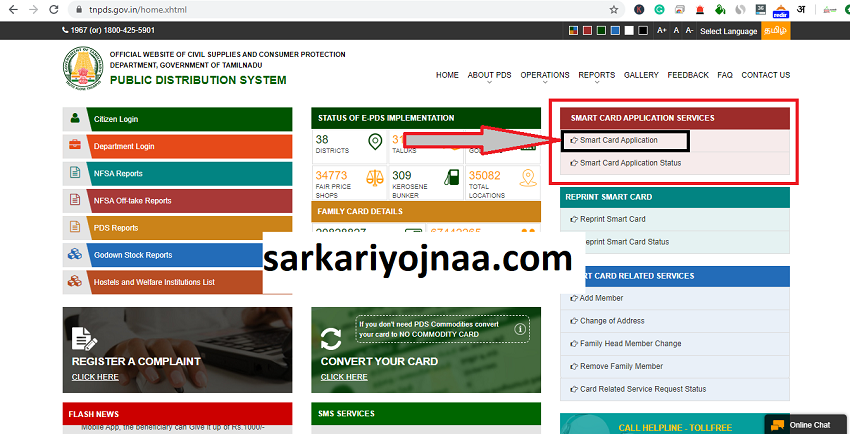
- ➡️ TNPDS Smart Ration Card Application click option only before an Application New Smart Card Form will come openly, Form Application Smart Card New to Phil you Tamil Nadu Smart Card will be able to apply for. The Smart Card New Application Form will open in some way as we have shown you below. 4
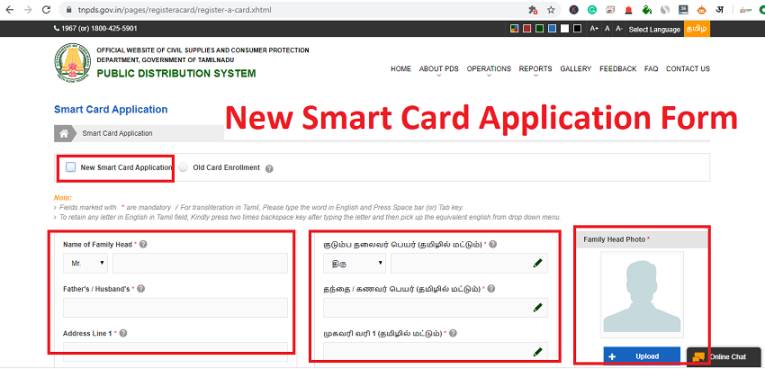
- ➡️ Here you have to enter all the information asked in the form. (Family head details, address, district, village, pincode, etc.)
- ➡️ You have to upload all the related documents. Upload photo (size under 10 KB) and residence proof (under 100 KB).
- ➡️ details of all the family members have to accept the details of the gas connection and declaration form etc.
- ➡️ Now you have to click on the Submit button.
- ➡️ as you Submit click on the button of your application TNPDS New Smart Ration Card will be.
Note: – After submitting the application, you will see an Application Reference Number here, keep it recorded, because of this number, you will be able to check your TNPDS Smart Ration Card Status in the future.
District Wise TNPDS Smart Ration Card Report: tnpds ration card status
| DISTRICT NAME | DISTRICT CODE | TOTAL NUMBER OF TALUKS | TOTAL NUMBER OF FPS | AAY CARDS | AAY BENEFICIARIES | PHH CARDS | PHH BENEFICIARIES | TOTAL NUMBER OF CARDS | TOTAL NUMBER OF BENEFICIARIES |
|---|---|---|---|---|---|---|---|---|---|
| 🔥 Thiruvallur | 01 | 9 | 1117 | 52191 | 161904 | 232693 | 711154 | 284884 | 873058 |
| 🔥 North Chennai | 02 | 9 | 878 | 16397 | 61230 | 319891 | 1121301 | 336288 | 1182531 |
| 🔥 South Chennai | 02 | 9 | 888 | 13571 | 53003 | 279514 | 983164 | 293085 | 1036167 |
| 🔥 Kanchipuram | 03 | 5 | 635 | 27637 | 90785 | 155835 | 488871 | 183472 | 579656 |
| 🔥 Vellore | 04 | 6 | 698 | 45381 | 168845 | 159196 | 496670 | 204577 | 665515 |
| 🔥 Thiruvannamalai | 05 | 12 | 1627 | 72896 | 272360 | 472635 | 1426083 | 545531 | 1698443 |
| 🔥 Viluppuram | 06 | 9 | 1254 | 68070 | 228503 | 368379 | 1190125 | 436449 | 1418628 |
| 🔥 Salem | 07 | 14 | 1541 | 79793 | 285306 | 478491 | 1478408 | 558284 | 1763714 |
| 🔥 Namakkal | 08 | 8 | 915 | 35710 | 127439 | 220627 | 626958 | 256337 | 754397 |
| 🔥 Erode | 09 | 10 | 1134 | 67949 | 221659 | 261734 | 701933 | 329683 | 923592 |
| 🔥 Nilgiris | 10 | 6 | 399 | 16722 | 53813 | 106550 | 316821 | 123272 | 370634 |
| 🔥 Dindigul | 11 | 10 | 1035 | 63881 | 211589 | 281404 | 881389 | 345285 | 1092978 |
| 🔥 Karur | 12 | 7 | 583 | 25518 | 93358 | 135950 | 416973 | 161468 | 510331 |
| 🔥 Thiruchirapalli | 13 | 11 | 1213 | 71764 | 263328 | 342747 | 1061436 | 414511 | 1324764 |
| 🔥 Perambalur | 14 | 4 | 282 | 24446 | 87983 | 89182 | 266552 | 113628 | 354535 |
| 🔥 Ariyalur | 15 | 4 | 441 | 34591 | 122637 | 136182 | 432726 | 170773 | 555363 |
| 🔥 Cuddalore | 16 | 10 | 1416 | 84834 | 296633 | 408117 | 1333760 | 492951 | 1630393 |
| 🔥 Nagapattinam | 17 | 4 | 353 | 38330 | 140654 | 115754 | 348753 | 154084 | 489407 |
| 🔥 Thiruvarur | 18 | 8 | 714 | 61246 | 224663 | 187938 | 573474 | 249184 | 798137 |
| 🔥 Thanjavur | 19 | 9 | 1183 | 91706 | 344448 | 309118 | 1017363 | 400824 | 1361811 |
| 🔥 Pudukkottai | 20 | 12 | 1002 | 44266 | 167929 | 295918 | 1006807 | 340184 | 1174736 |
| 🔥 Sivagangai | 21 | 9 | 827 | 47663 | 178176 | 194849 | 622500 | 242512 | 800676 |
| 🔥 Madurai | 22 | 11 | 1389 | 57609 | 182567 | 394788 | 1212285 | 452397 | 1394852 |
| 🔥 Theni | 23 | 5 | 517 | 36259 | 117142 | 172018 | 507574 | 208277 | 624716 |
| 🔥 Virudhunagar | 24 | 10 | 961 | 48594 | 176890 | 244490 | 741320 | 293084 | 918210 |
| 🔥 Ramanathapuram | 25 | 9 | 775 | 39714 | 140929 | 195771 | 663565 | 235485 | 804494 |
| 🔥 Tuticorin | 26 | 10 | 957 | 64822 | 236587 | 201408 | 660163 | 266230 | 896750 |
| 🔥 Tirunelveli | 27 | 8 | 796 | 29580 | 113526 | 202095 | 668490 | 231675 | 782016 |
| 🔥 Kanyakumari | 28 | 6 | 764 | 62598 | 239755 | 219722 | 745277 | 282320 | 985032 |
| 🔥 Dharmapuri | 29 | 7 | 1048 | 53504 | 209149 | 239629 | 772575 | 293133 | 981724 |
| 🔥 Krishnagiri | 30 | 8 | 1094 | 67768 | 256408 | 224041 | 762627 | 291809 | 1019035 |
| 🔥 Coimbatore | 31 | 12 | 1401 | 52072 | 164277 | 343570 | 1004407 | 395642 | 1168684 |
| 🔥 Tiruppur | 32 | 9 | 1135 | 36781 | 108171 | 250134 | 701559 | 286915 | 809730 |
| 🔥 Tenkasi | 33 | 8 | 658 | 45798 | 165096 | 201966 | 635039 | 247764 | 800135 |
| 🔥 Kallakurichi | 34 | 6 | 766 | 43554 | 152080 | 275715 | 923264 | 319269 | 1075344 |
| 🔥 Ranipet | 35 | 6 | 614 | 35157 | 131318 | 123635 | 369670 | 158792 | 500988 |
| 🔥 Tirupathur | 36 | 4 | 509 | 33683 | 132815 | 145260 | 489489 | 178943 | 622304 |
| 🔥 Chengalpet | 37 | 6 | 841 | 33657 | 104173 | 199897 | 625722 | 233554 | 729895 |
| 🔥 Mayiladuthurai | 38 | 4 | 413 | 37690 | 137884 | 141751 | 451398 | 179441 | 589282 |
| Total | 314 | 34773 | 1863402 | 6625012 | 9328594 | 29437645 | 11191996 | 36062657 |
TNPDS SMART RATION CARD OFFLINE APPLY
To apply TNPDS Smart Ration Card Offline, you will have to apply from the ration card shop.
- ➡️ First of all visit the concerned ration card shop.
- ➡️ and ask the ration shopkeeper for the form for the smart ration card application.
- ➡️ Fill the application form and attach all the relevant documents.
- ➡️ Submit the filled form and all related documents to the concerned department.
- ➡️ After submission of the form, you will get an application number, or it is also called an application slip, keep safe with you to check the status of the application in the future.
TNPDS SMART RATION CARD THREW TNPDS APP
You can download Tamil Nadu TNePDS App Mobile Application in Android phone from Google Play Store and Apple phone in iOS Apple Store, through this TNePDS App you can also apply to make a new ration card.
tnpds App download
- ➡️ For Android Users, Click here to Download
- ➡️ For IOS Users, Click Here To Download
HOW TO VIEW TNPDS NFSA REPORTS?
If you want to see the NFSA report under Tamil Nadu Smart Ration Card , then for this you have to carefully follow the procedure given below.
- ➡️ First Tamil Nadu Public Distribution System, TNPDS to visit the official website.
- ➡️ TNPDS visit the website itself in front of the Home Page Frank will come.
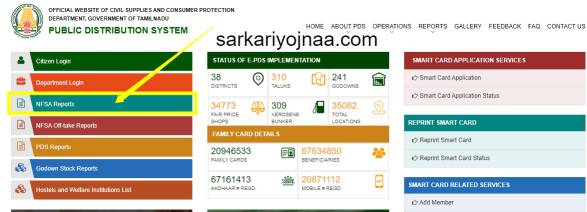
- ➡️ On the home page you will see a link to NFSA Reports at the top , as you can see here. 4
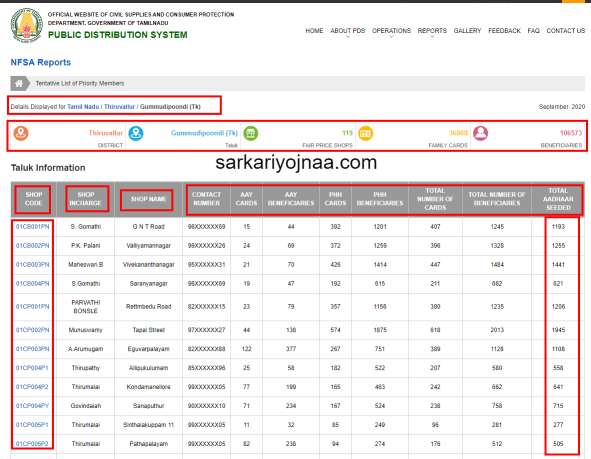
- ➡️ NFSA Reports will come to open a new page just before you click on the option, where you at will see the name of the 38 districts and all the beneficiaries will see their information . As can be seen here.
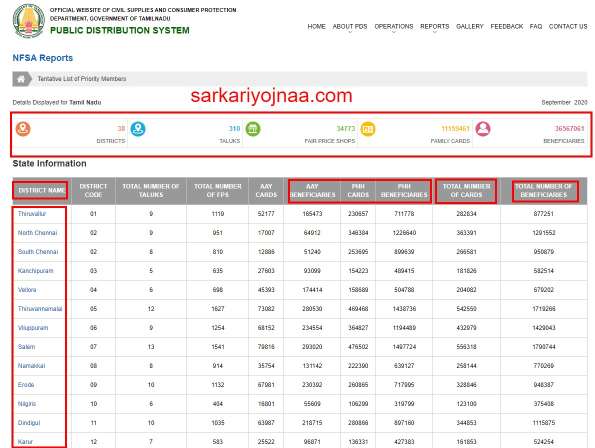
- ➡️ Now you have to click on your district, then you will click on the name of your taluka, after clicking on the name of taluka, you will get a list of beneficiary and you will be able to see the complete information. As seen below here
TAMIL NADU NFSA REPORTS DISTRICT WISE CHECK 2025
| DISTRICT NAME | DISTRICT CODE | TOTAL NUMBER OF TALUKS | TOTAL NUMBER OF FPS | AAY CARDS | AAY BENEFICIARIES | PHH CARDS | PHH BENEFICIARIES | TOTAL NUMBER OF CARDS | TOTAL NUMBER OF BENEFICIARIES |
|---|---|---|---|---|---|---|---|---|---|
| 🔥 Thiruvallur | 01 | 9 | 1119 | 52177 | 165473 | 230657 | 711778 | 282834 | 877251 |
| 🔥 North Chennai | 02 | 9 | 951 | 17007 | 64912 | 346384 | 1226640 | 363391 | 1291552 |
| 🔥 South Chennai | 02 | 8 | 810 | 12886 | 51240 | 253695 | 899639 | 266581 | 950879 |
| 🔥 Kanchipuram | 03 | 5 | 635 | 27603 | 93099 | 154223 | 489415 | 181826 | 582514 |
| 🔥 Vellore | 04 | 6 | 698 | 45393 | 174414 | 158689 | 504788 | 204082 | 679202 |
| 🔥 Thiruvannamalai | 05 | 12 | 1627 | 73082 | 280530 | 469468 | 1438736 | 542550 | 1719266 |
| 🔥 Viluppuram | 06 | 9 | 1254 | 68152 | 234554 | 364827 | 1194489 | 432979 | 1429043 |
| 🔥 Salem | 07 | 13 | 1541 | 79816 | 293020 | 476502 | 1497724 | 556318 | 1790744 |
| 🔥 Namakkal | 08 | 8 | 914 | 35754 | 131142 | 222390 | 639127 | 258144 | 770269 |
| 🔥 Erode | 09 | 10 | 1132 | 67981 | 230392 | 260865 | 717995 | 328846 | 948387 |
| 🔥 Nilgiris | 10 | 6 | 404 | 16801 | 55609 | 106299 | 319799 | 123100 | 375408 |
| 🔥 Dindigul | 11 | 10 | 1035 | 63987 | 218715 | 280866 | 897160 | 344853 | 1115875 |
| 🔥 Karur | 12 | 7 | 583 | 25522 | 96871 | 136331 | 427383 | 161853 | 524254 |
| 🔥 Thiruchirapalli | 13 | 11 | 1213 | 71827 | 270432 | 342984 | 1071432 | 414811 | 1341864 |
| 🔥 Perambalur | 14 | 4 | 282 | 24452 | 91051 | 88485 | 269553 | 112937 | 360604 |
| 🔥 Ariyalur | 15 | 4 | 440 | 34611 | 125776 | 134755 | 433636 | 169366 | 559412 |
| 🔥 Cuddalore | 16 | 10 | 1416 | 84938 | 305258 | 405875 | 1347640 | 490813 | 1652898 |
| 🔥 Nagapattinam | 17 | 8 | 766 | 76066 | 284598 | 256399 | 801254 | 332465 | 1085852 |
| 🔥 Thiruvarur | 18 | 8 | 714 | 61299 | 230039 | 186156 | 572760 | 247455 | 802799 |
| 🔥 Thanjavur | 19 | 9 | 1183 | 91749 | 351346 | 307934 | 1020809 | 399683 | 1372155 |
| 🔥 Pudukkottai | 20 | 12 | 1002 | 44292 | 172877 | 294090 | 1015412 | 338382 | 1188289 |
| 🔥 Sivagangai | 21 | 9 | 827 | 47700 | 182973 | 195022 | 627272 | 242722 | 810245 |
| 🔥 Madurai | 22 | 11 | 1389 | 57673 | 187919 | 393479 | 1224094 | 451152 | 1412013 |
| 🔥 Theni | 23 | 5 | 517 | 36258 | 120377 | 171942 | 511746 | 208200 | 632123 |
| 🔥 Virudhunagar | 24 | 10 | 961 | 48621 | 182883 | 245829 | 751892 | 294450 | 934775 |
| 🔥 Ramanathapuram | 25 | 9 | 775 | 39776 | 145622 | 195765 | 674703 | 235541 | 820325 |
| 🔥 Tuticorin | 26 | 10 | 957 | 64948 | 245753 | 200815 | 669275 | 265763 | 915028 |
| 🔥 Tirunelveli | 27 | 8 | 789 | 29429 | 117449 | 200125 | 674898 | 229554 | 792347 |
| 🔥 Kanyakumari | 28 | 6 | 765 | 62650 | 246235 | 219260 | 753690 | 281910 | 999925 |
| 🔥 Dharmapuri | 29 | 7 | 1048 | 53518 | 218017 | 237328 | 786753 | 290846 | 1004770 |
| 🔥 Krishnagiri | 30 | 8 | 1094 | 67763 | 263139 | 222374 | 770701 | 290137 | 1033840 |
| 🔥 Coimbatore | 31 | 12 | 1403 | 51969 | 168527 | 342158 | 1015064 | 394127 | 1183591 |
| 🔥 Tiruppur | 32 | 9 | 1135 | 36707 | 111339 | 249977 | 712921 | 286684 | 824260 |
| 🔥 Tenkasi | 33 | 8 | 665 | 45991 | 173394 | 203661 | 654784 | 249652 | 828178 |
| 🔥 Kallakurichi | 34 | 6 | 766 | 43595 | 156792 | 272686 | 929956 | 316281 | 1086748 |
| 🔥 Ranipet | 35 | 4 | 613 | 35170 | 133966 | 123264 | 371698 | 158434 | 505664 |
| 🔥 Tirupattur | 36 | 4 | 509 | 33738 | 135522 | 145080 | 492657 | 178818 | 628179 |
| 🔥 Chengalpattu | 37 | 6 | 841 | 33686 | 107379 | 198235 | 629154 | 231921 | 736533 |
| Total | 310 | 34773 | 1864587 | 6818634 | 9294874 | 29748427 | 11159461 | 36567061 |
TNPDS STATUS, SMART RATION CARD APPLICATION STATUS?
If you Tamil Nadu Smart Ration Card applied for and want to check its status then you have to Application Reference Number is required if you have Application Number then your status Application Smart ration card can check fairly easily.
TNPDS SMART RATION CARD APPLICATION STATUS CHECK
- ➡️ First of all Tnpds Tamil Nadu, the official website is https://www.tnpds.gov.in/home.xhtml, click here to go to https://www.tnpds.gov.in/home.xhtml.
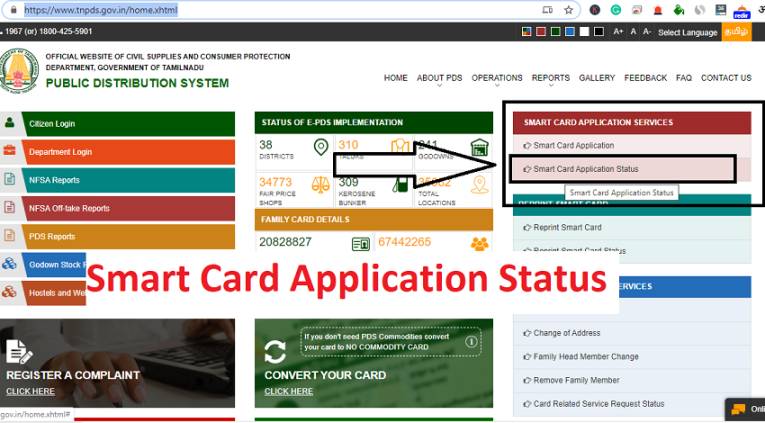
- Home Page will open in front of you, on which the second option under Smart Card Application Service will be seen on Smart Card Application Status, as shown here.
- On clicking the option of Smart card application status, a new page will open in front of you, which will be something like this.
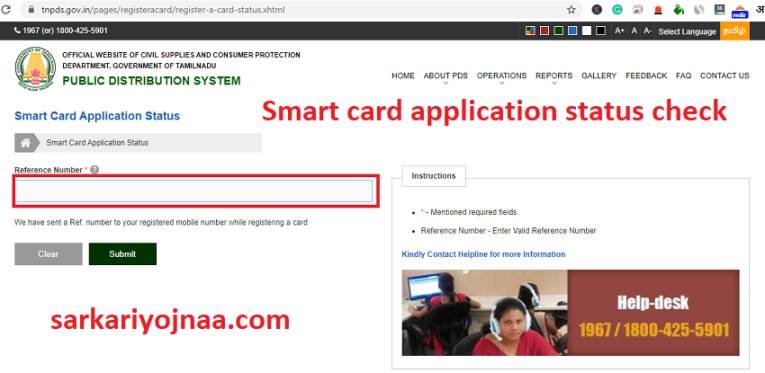
- ➡️ Here you have to enter the reference number first.
- After entering the reference number, you have to click on the submit button.
- ➡️ As soon as you click on the button of Submit, the information about TNPDS Smart Ration Card Application Status will come in front of you.
Status meanings: Submitted – Application received; Under Verification – Taluk office checking; Approved – Processing complete; Card Printed – Physical card printing; Dispatched – Sent via Speed Post; Rejected – Check reason, reapply.
TNPDS SMART RATION CARD COMPLAINT REGISTRATION PROCESS
If you want to register any type of Ration Card-related Complaint, then its option is also given on the TNPDS website. Follow the procedure given below to get TNPDS Smart Ration Card Compliant Registration.
- ➡️ First of all, visit the TNPDS official website.
- ➡️ Home Page on “Register a Complaint” on the option.
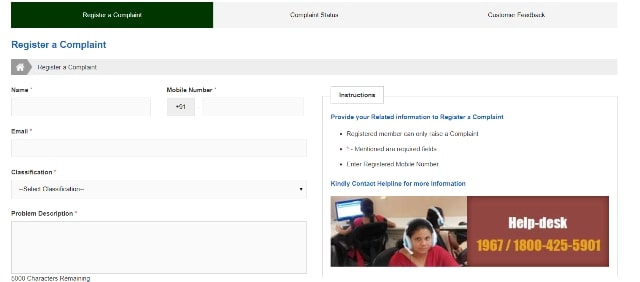
- ➡️ Now a new page will open in front of you, where you will have to write related information and what is the problem in 5000 characters. The compliant page will be as we have shown below. 4
- After entering the type and implant of your implant, you have to click on the submit button.
- As soon as you submit, you will get to see a reference number here and keep it safe for future.
- Due to this number, you will also be able to check the status of your application in future.
TNPDS SMART RATION CARD HELP DESK CONTACT NUMBER
If you have any kind of problem related to the Smart Ration Card or you want some kind of information, then you can call the official number of the Tamil Nadu Help Desk.
For any questions related to smart cards, you can contact 1967 or 1800-425-5901. Please send the code from your registered mobile number to 9773904050. Short Code Description:
- Helpline Number- 1967 or 18004255901
- Email Id- support@tnpds.com
- NFSA National Helpline: 14445
PDS <space> 101 – Item Description at Fair Price Store
PDS <space> 102 – Fair Price Outlet (opened / closed)
PDS <space> 107 – For complaint of payment amount
TNPDS SMART RATION CARD CORRECTION PROCESS
- ➡️ First you have to go to its official website to make smart ration card changes , click here to go to the official website . 4
- ➡️ Select the option according to the changes you want to make in the right side on the home page
- Add members
- Change of address
- Changes in Head of Family
- Family member removal
- ➡️ Select any changes you want to make and a new page will open in front of you, in this you will have to enter your registered mobile number and enter the captcha code.
- ➡️ According to the changes you want to make on the submit, you have to select and enter the information that will open on this screen.
- ➡️ Now the form for the change in ration card will open in front of you, you will have to fill all the information considered in it carefully.
- करेंगे You will upload all the required documents (if necessary)
- ➡️ Once all the information is correct, you have to click on the submit button.
Note: – After clicking on the submit button, your TNPDS Smart Ration Card Correction is applied and you have to wait for some time after a few days your ration card improves in your mind.
TNPDS SMART RATION CARD CORRECTION STATUS CHECK
- ➡️ First of all you have to go to the official website of Tamil Nadu Ration Card .
- ➡️ As soon as you go to the website, you will see an option of Card Related Service Request Status .
- ➡️ Click on the option of Card Related Service Request Status and you have to enter and submit the reference number you have received.
- ➡️ As soon as you enter the given reference number, your correction status comes in front of you.
Check Card Related Service Request Status
- To check the card related service request status, you need to open the official website
- On home page select “card related service request status” option as per the change you want to make available in the right-hand side
- Enter the reference number and select submit option
- The status will display on the computer screen
Procedure to Apply For Duplicate Electronic Family Card
- First of all, you have to go to the official website of the department of food supply and consumer protection government of Tamil Nadu
- A home page will be open in front of you
- On the home page, you have to click on apply for duplicate electronic family card
- After that, you need to enter your registered mobile number and captcha code
- Now a form will be open in front of you
- You have to enter all the required details in this form and attach all the necessary document
- Now you need to click on submit
- In this way, you can apply for duplicate electronic family card
https://youtu.be/ZGE-2mhpFFU

Ration card online, status ration card, ration card download
CSC Digital Cadets Bharti , CSC Requirement 2023
FAQ TNPDS SMART RATION CARD 2026
“Yes” is being promoted as digitization giving so does the state government and central government emphasis on digital ration cards. Even the “One Nation One Ration Card Scheme” is being promoted by the government, so the sooner you make your smart ration card, the better it is for you.
“No” If you apply for a smart card online with the help of tnpsc in Tamil Nadu, then you do not have to pay any kind of charge.
If you want to apply online to make a smart card, then we should explain the procedure in detail in the above article.
First of all, visit the official website of tnpsc.
On the home page of the website, you will see the link for Applications for new smart ration card , click on it and fill the application form.
After filling the application form, you have to submit and as soon as you submit your application for smart ration card is online.
To check tnpds ration card status, you will have to visit more tnpsc website and here you will see the link for Status for Smart Ration Card, by clicking on it you will be able to get the status information. By the way, information about how to check the status of Smart Ration Card application, we have given you in detail in the above article.
The following are the documents required to make a smart ration card. tnpsc group 4
Aadhar Card
Pan Card
Recent Size Photography Pass
Bank passbook
Caste/Category certificate
Income certificate
Electricity bill