

Karnataka Nadakacheri CV has been introduced by the Government of Karnataka to provide various online services and certificates to the residents of Karnataka, using which residents of the state can apply online for different types of certificates, you can use Karnataka Nadakacheri CV You can apply for the certificate like caste certificate, income certificate, etc. using the portal as well as see the status information of it. So in today’s article, we will give you almost all the information related to CV Nadakacheri Portal, so you must read this article till the end.
Read This Post In Hindi
KARNATAKA NADAKACHERI CV @ NADAKACHERI.KARNATAKA.GOV.IN
By the Karnataka government, Nadakacheri underwent launched this portal to facilitate has been involved Jnsnehi Center project effectively, and save time for citizens of the state under the project and single-window facility to put the main objective to provide has gone. Which CV Nadakacheri Portal has been developed which facilitates many departments. Through ATALJI JANASNEHI KENDRA (Nadakacheri CV) , people are mainly provided with facilities like income, living, minority, land, and agriculture along with unemployment and social security pension. The following services are mainly provided by Karnataka Nadakacheri CV.
KARNATAKA NADAKACHERI CV IMPORTANT SERVICES
The following services are mainly provided to the residents of Karnataka state through this portal: –
- ➡️ Agri Services
- ➡️ Caste Certificate
- ➡️ Attestation For Family Tree
- ➡️ Income Certificate
- ➡️ Living Certificate
- ➡️ Minority Certificate
- ➡️ HK Region Residential And Eligibility Certificate
- ➡️ Residential / Dominic Certificate
- ➡️ OBC Certificate
- ➡️ Population Certificate
- ➡️ Land Holding Certificate
- ➡️ Surviving Family Member /No Govt Job Certificate
Karnataka CV Nadakacheri Highlights
| 🔥 Scheme Name | 🔥 Karnataka Nadakacheri CV |
| 🔥 Started | 🔥 Atalji Janasnehi Center Project |
| 🔥 Beneficiaries | 🔥 All residents of Karnataka state |
| 🔥 Benefits | 🔥 To save time and make all services digitally accessible to citizens |
| 🔥 Purpose | 🔥 Providing a window to the services of different departments of the state and digitizing certificates. |
| 🔥 Official website | 🔥 https://nadakacheri.karnataka.gov.in/ |
NADAKACHERI INCOME CERTIFICATE APPLY
If you are from Karnataka state and you want to apply for your income certificate then you can do this through the official website of CV Nadakacheri.
CV NADAKACHERI INCOME CERTIFICATE APPLICATION PROCESS STEP BY STEP
- ➡️ First of all you have to go to the official website of Karnataka Nadakacheri CV, click here to go.
- ➡️ As soon as you go to the website, its Home Page will open in front of you, as you can see here.

- ➡️ Home Page on the Menu bar you Application Online will see an option, Application Online you under Apply Online will see the option. As can be seen here. 4

- By clicking on the option of ➡️ Apply Online एक a new web page will open in front of you, as you can see below. 4
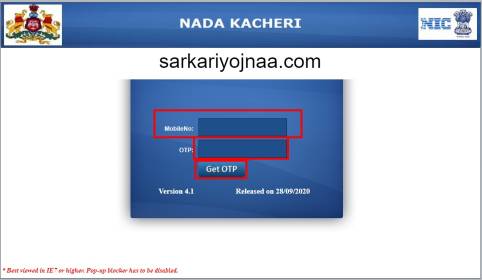
- ➡️ Now here you have to enter your mobile number and click on the Get OTP button, enter OTP on mobile, and login.
- ➡️ Now you are logged in under the application and here you have to click on the link to make a new request section.
- में In the next option, you will select whichever certificate you want to apply for, such as “Income Certificate” .
- ➡️ Now the application for income certificate will open in front of you and you will be asked a lot of information in it.
- ➡️ Here you have to enter all your details such as your name address, source of your income, and all the information related to how much income is there and attach the relevant documents.
- ➡️ After entering all the information, you can check your information and click on the Save button.
- ➡️ Note, before submitting the application form final, double-check all the information given by you only then submit the application form final.
- ➡️ Now an acknowledgment receipt has been sent to your mobile number and enter the acknowledgment number and pay the fee.
- Online To pay the fee, you have to use the option of online payment and after entering all the information, click on the option of Make payment.
- ➡️ When you pay the payment, then you are provided with the income certificate by the officer concerned.
DOCUMENTS REQUIRED FOR INCOME CERTIFICATE |
| If you apply for an income certificate through the official website of Karnataka Nadakacheri CV, then in such a situation you must have the following documents: – ➡️ Aadhaar Card ➡️ application form ➡️ mobile number ➡️ A report released by Patwari Sarpanch ➡️ Residence certificate |
NADAKACHERI CASTE CERTIFICATE APPLY
If you are from Karnataka state and you want to apply for your caste certificate then you can do this through the official website of CV Nadakacheri.
CV NADAKACHERI CASTE CERTIFICATE APPLICATION PROCESS STEP BY STEP
- ➡️ First of all you have to go to the official website of Karnataka Nadakacheri CV, click here to go.
- ➡️ As soon as you go to the website, its Home Page will open in front of you, as you can see here.
- ➡️ Home Page on the Menu bar you Application Online will see an option, Application Online you under Apply Online will see the option. As can be seen here. 4
- ➡️ By clicking on the option of ➡️ Apply Online एक a new web page will open in front of you, as you can see below. 4
- ➡️ Now here you have to enter your mobile number and click on the Get OTP button, enter OTP on mobile, and log in.
- ➡️ Now you are logged in under the application and here you have to click on the link to make a new request section.
- ➡️ In the next option, you will select whichever certificate you want to apply for, such as “Caste Certificate”.
- ➡️ Now the application for the certificate that goes before you will open and you will be asked for a lot of information in it.
- ➡️ Here you have to enter all your details such as your name address, and all the information related to your caste and attach the relevant documents.
- ➡️ After entering all the information, you can check your information and click on the save button.
- ➡️ Note, before submitting the application form final, double-check all the information given by you only then submit the application form final.
- ➡️ Now an acknowledgment receipt has been sent to your mobile number enter the acknowledgment number and pay the fee.
- Online To pay the fee, you have to use the option of online payment and after entering all the information, click on the option of Make payment.
- ➡️ When you have paid the payment, then you are provided with the going certificate by the concerned officer.
DOCUMENTS REQUIRED FOR CASTE CERTIFICATE |
If you apply for the certificate by going through the official website of Karnataka Nadakacheri CV , in such a situation you must have the following documents: –
|
NADAKACHERI RESIDENCE CERTIFICATE APPLY
If you are from Karnataka state and you want to apply for your residence certificate then you can do this through the official website of CV Nadakacheri.
CV NADAKACHERI RESIDENCE CERTIFICATE APPLICATION PROCESS STEP BY STEP
- ➡️ First of all you have to go to the official website of Karnataka Nadakacheri CV, click here to go.
- ➡️ As soon as you go to the website, your Home Page will open in front of you , as you can see here.
- ➡️ Home Page on the Menu bar you Application Online will see an option, Application Online you under Apply Online will see the option. As can be seen here. 4
- ➡️ By clicking on the option of ➡️ Apply Online एक a new web page will open in front of you, as you can see below. 4
- ➡️ Now here you have to enter your mobile number and click on Get OTP button, enter OTP on mobile, and log in.
- ➡️ Now you are logged in under the application and here you have to click on the link to make a new request section.
- ➡️ In the next option, you will select whichever certificate you want to apply for, such as “Residence Certificate”.
- ➡️ Now the application for a residence certificate will open in front of you and you will be asked a lot of information in it.
- ➡️ Here you have to enter all your details such as your name address, and all the information related to your residence, and attach the relevant documents.
- ➡️ After entering all the information, you can check your information and click on the save button.
- ➡️ Note, before submitting the application form final, double-check all the information given by you only then submit the application form final.
- ➡️ Now an acknowledgment receipt has been sent to your mobile number enter the acknowledgment number and pay the fee.
- Online To pay the fee, you have to use the online payment option and after entering all the information, click on the option of Make payment.
- ➡️ When you pay the payment, then you are provided with the residence certificate by the concerned officer.
DOCUMENTS REQUIRED FOR RESIDENCE CERTIFICATE |
If you apply for the residence certificate through the official website of Karnataka Nadakacheri CV , in such a situation you must have the following documents: –
|
KARNATAKA CV NADAKACHERI APPLICATION STATUS
If you apply for any application from Karnataka Nadakacheri CV Portal, then you can also check the status of that application from CV Nadakacheri Portal. The process of which we are elaborating below.
HOW TO CHECK NADAKACHERI CV APPLICATION STATUS
- ➡️ First of all, you have to go to the official website of Karnataka Nadakacheri CV, click here to go.
- ➡️ As soon as you go to the website, your home page will open in front of you.
- ➡️ As soon as you go to the option of Online Application in the menu bar, you will see another option of Application Status, as you can see below.

- ➡️ Status ↗️ Application click option will come to open a new page in front of you. As shown below. 4

- ➡️ Where first you have to select Application Type and then you have to enter the Application Number and click on the Get Status button.
- ➡️ As soon as you click on the application status button, you will get the information of NADAKACHERI ATALJI JANASNEHI KENDRA Application Status .
NADAKACHERI CERTIFICATE VERIFICATION
If you have a recent or an old certificate that you want to check whether it is original or not, then you can go to CV Nadakacheri Portal to do the verification process.
KARNATAKA NADAKACHERI CV ONLINE CERTIFICATE VERIFICATION
- ➡️ First you will be released on the official website of Nadakacheri .
- ➡️ As soon as you go to the website, you will get to see the option of Online Application in the Menu bar on the Home Page .
- ➡️ On clicking the online application, you will see an option of Nadakacheri Certificate Verification in the dropdown-menu , as can be seen below. 4
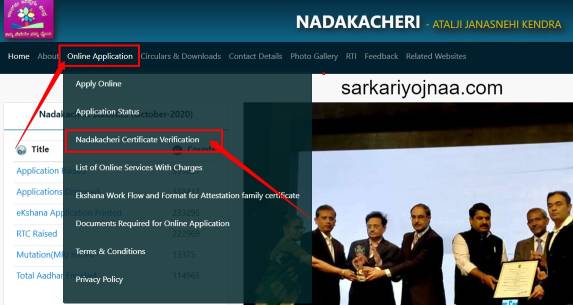
- ➡️ Nadakacheri Certificate Verification just click option is shown at right in front of you will be able to open a new page. 4
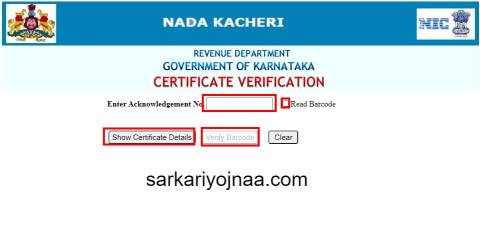
- ➡️ Here you have to enter the enrollment number and click on the option of certificate details, you can do the same process by selecting the option of read barcode.
- ➡️ As soon as you enter the Acknowledgment Number and click on Show Certificate Details , your certificate information will come in front of you. If your certificate information is successfully shown, then your certificate verification is getting successful and the certificate you have is completely valid. is .
KARNATAKA NADAKACHERI CV ONLINE SERVICES, SERVICE CHARGES AND TIMING IN WORKING DAY
| S.No. | Service Name | Service Charge(In Rs) | Stipulated Timeline in Sakala (Working days) |
|---|---|---|---|
| 🔥 1 | Agricultural Family member cer | 25 | 14 |
| 🔥 2 | Agricultural Labour Certficate | 25 | 14 |
| 🔥 3 | Agriculturist Certificate | 25 | 14 |
| 🔥 4 | Attestation of Family Tree | 25 | 14 |
| 🔥 5 | Bonafide Certificate | 25 | 7 |
| 🔥 6 | Caste and Income Certficate | 25 | 21 |
| 🔥 7 | Caste Certificate (Cat-A) | 25 | 21 |
| 🔥 8 | Caste Certificate (SC/ST) | 25 | 21 |
| 🔥 9 | Domicile Certificate | 25 | 14 |
| 🔥 10 | HK Region Residence and Eligibility Certficate | 25 | 30 |
| 🔥 11 | Income Certificate for compass for Employment | 25 | 21 |
| 🔥 12 | Income Certificate for Employment Certificate | 25 | 21 |
| 🔥 13 | Land holding Certificate | 25 | 21 |
| 🔥 14 | Land less Certificate | 25 | 7 |
| 🔥 15 | Living Certificate | 25 | 7 |
| 🔥 16 | Income Certificate | 25 | 21 |
| 🔥 17 | No Govt. Job Certificate | 25 | 7 |
| 🔥 18 | No Re-Marriage Certificate | 25 | 7 |
| 🔥 19 | Non creamy layer Certificate | 25 | 21 |
| 🔥 20 | Non Tenancy Certificate | 25 | 7 |
| 🔥 21 | OBC Certificate (Central) | 25 | 21 |
| 🔥 22 | Population Certificate | 25 | 7 |
| 🔥 23 | Residence Certificate | 25 | 7 |
| 🔥 24 | Small / Marginal farmer Certificate | 25 | 14 |
| 🔥 25 | Solvency Certificate | 25 | 21 |
| 🔥 26 | Surviving Family Members Certificate | 25 | 14 |
| 🔥 27 | Unemployment Certificate | 25 | 7 |
| 🔥 28 | Widow Certificate | 25 | 7 |
| 🔥 29 | Minority Certificate | 25 | 7 |
| 🔥 30 | Economically Weaker Section (EWS) | 25 | 21 |
| 🔥 31 | General Certificate (Arya Vysya) | 25 | 21 |
| 🔥 32 | Physically Handicapped Pension | 00 | 45 |
| 🔥 33 | Widow Pension | 00 | 45 |
| 🔥 34 | Sandhya suraksha yojane | 00 | 45 |
| 🔥 35 | National Family Benefit Scheme | 00 | 70 |
| 🔥 36 | Indira Gandhi National Old Age Pension | 00 | 45 |
| 🔥 37 | Mythiri | 00 | 45 |
| 🔥 38 | Manaswini | 00 | 45 |
| 🔥 39 | Anthya Samskara Yojane | 00 | 10 |
| 🔥 40 | Acid Victim Pension | 00 | 45 |
| 🔥 41 | Farmer Widow Pension | 00 | 45 |
| 🔥 42 | Endosalphan Victim Pension | 00 | 30 |
KARNATAKA NADAKACHERI CV MOBILE APPLICATION DOWNLOAD
- ➡️ First you need to go to Google Play Store
- ➡️ After going to the play store, you have to enter Nadakacheri CV in the search box.
- ➡️ Now many applications will open in front of you.
- ➡️ In which you have to download CV Nadakacheri Official Mobile Application.
- ➡️ After downloading, install it in your phone and then you will be able to use it in your phone by clicking the button of Open.
HOW TO FILE KARNATAKA NADAKACHERI CV FEEDBACK
If you want to get any kind of suggestion or complaint related to Karnataka Nadakacheri otherwise you can use the Feedback Option to do so.
NADAKACHERI CV FEEDBACK SUBMIT PROCESS STEP BY STEP
- ➡️ You must first go to the official website of Nadakacheri CV .
- ➡️As soon as you go to the website , you will see the option of Feedback in the Menu Bar on the Home Page .
- ➡️ By clicking on the option of Feedback , a new page will open in front of you as you can see below. 4

- ➡️ Here you will submit your name, mobile number, email id and whatever complaint or suggestion you have.
- ➡️ As soon as you submit, your Nadakacheri CV Feedback will be submitted and action will be taken by the concerned officer.
KARNATAKA NADAKACHERI CV CONTACT DETAILS
If you have any complaints or suggestions related to Nadakacheri and otherwise want to get any information by contacting your district level officer, then we are giving you the details below. You can get the information by contacting the concerned officer of your district.
| S.NO | District | Name | Contact No | |
|---|---|---|---|---|
| 🔥 1 | Bagalkote | Ramesh N Helvar | 8277862915 | bagalakot.nemmadi@gmail.com |
| 🔥 2 | Bengaluru Rural | Sreekrishna Raj Urs KH | 8277862937 | ajskrural@gmail.com |
| 🔥 3 | Bengaluru urban | Ashwin Kumar T | 8277862948 | bengaloreurban.nemmadi1@gmail.com |
| 🔥 4 | Bangalore Urban (Addl Consultant) | Chandru N R | 8277862936 | bengaloreurban.nemmadi2@gmail.com |
| 🔥 5 | Belgaum | Vishnuvardhan Lamani | 8277862913 | belgaum.nemmadi@gmail.com |
| 🔥 6 | Belgaum (Addl Consultant) | Praveenkumar Hundekar | 8277862914 | belgaum.nemmadi.ckd@gmail.com |
| 🔥 7 | Bellary | Basavaraj CM | 8277862927 | bellary.nemmadib1@gmail.com |
| 🔥 8 | Bidar | Syed Abid | 8277862919 | bidar. nemmadi@gmail.com |
| 🔥 9 | Bijapur | Anand Rathod | 8277862916 | bijapur.ajsk@gmail.com |
| 🔥 10 | Chamraj Nagar | Harish | 8277862943 | crn.nemmadi1@gmail.com |
| 🔥 11 | Chikkamagalore | Niranjan G D | 8277862932 | nemmadi.ckm@gmail.com |
| 🔥 12 | Chikkaballapur | Ajay B V | 8277862945 | ckb.it.consultant@gmail.com |
| 🔥 13 | Chitradurga | Srikanth | 8277862928 | chitradurga1.nemmadi@gmail.com |
| 🔥 14 | Davanagere | Vinaya V | 8277862929 | davangere.nemmadi@gmail.com |
| 15 | Dakshina Kannada | Anantha Das | 8277862940 | mangalore.nemmadi@gmail.com |
| 🔥 16 | Dharwad | Vikas Pujar | 8277862923 | Dharwad.nemmadi@gmail.com |
| 🔥 17 | Gadag | Prasad Hiremath | 8277862922 | gadag.nemmadi@gmail.com |
| 🔥 18 | Gulbarga | Shreekant Reddy | 8277862917 | gulbarga.nemmadi@gmail.com |
| 🔥 19 | Gulbarga (Addl Consultant) | Amaresh | 8277862917 | gulbarga.nemmadi2@gmail.com |
| 🔥 20 | Hassan | Chandrakanth P S | 8277862939 | hassan.nemmadi@gmail.com |
| 🔥 21 | Breakdown | Prabhu | 8277862926 | haveri.nemmadi@gmail.com |
| 🔥 22 | Kodagu | Somashekar J Pattar | 8277862941 | kodagu.nemmadi@gmail.com |
| 🔥 23 | Kolar | Tejaswini M | 8277862935 | klr.nemmadi@gmail.com |
| 🔥 24 | Koppal | Prasad | 8277862921 | koppal.ajsk@gmail.com |
| 🔥 25 | Mandya | Rakesh L | 8277862938 | mandya.nemmadi@gmail.com |
| 🔥 26 | Mysore | Lokesh S | 8277862942 | mysore.nemmadi1@gmail.com |
| 🔥 27 | Raichur | Mohammad Imran | 8277862920 | raichur.nemmadi@gmail.com |
| 🔥 28 | Ramanagar | Madhu Bagur | 8277862944 | rmgr.nk@gmail.com |
| 🔥 29 | Shimoga | Girisha B | 8277862930 | shimoga.nemmadi@gmail.com |
| 🔥 30 | Tumkur | Renukesha G H | 8277862933 | ajsk.tumkur1@gmail.com |
| 🔥 31 | Tumkur (Addl Consultant) | Vijay Kumar | 8277862934 | tmkajsk@gmail.com |
| 🔥 32 | Uttarakanada (Addl Consultant) | Nagesh | 8277862924 | ajsk.karwar@gmail.com |
| 🔥 33 | Uttarakanada | Akshata R Bandekar | 8277862925 | uk.nemmadi@gmail.com |
| 🔥 34 | Udupi | Harshith. Where | 8277862931 | udupi.nemmadi@gmail.com |
| 🔥 35 | Yadagiri | Madhu Sudhan Guru | 8277862946 | yadgir.nemmadi@gmail.com |
Note: – In this article today, you have got almost information related to Karnataka Nadakacheri CV, if you still want to ask anything, then you can ask through our comment, we will be replying through your comment
ध्यान दें :- ऐसे ही केंद्र सरकार और राज्य सरकार के द्वारा शुरू की गई नई या पुरानी सरकारी योजनाओं की जानकारी हम सबसे पहले अपने इस वेबसाइट sarkariyojnaa.com के माध्यम से देते हैं तो आप हमारे वेबसाइट को फॉलो करना ना भूलें ।
अगर आपको यह आर्टिकल पसंद आया है तो इसे Like और share जरूर करें ।
इस आर्टिकल को अंत तक पढ़ने के लिए धन्यवाद…
Posted by Amar Gupta
🔥🔥 Join Our Group For All Information And Update, Also Follow me For Latest Information🔥🔥 | |
| 🔥 Follow US On Google News | Click Here |
| 🔥 Whatsapp Group Join Now | Click Here |
| 🔥 Facebook Page | Click Here |
| Click Here | |
| 🔥 Telegram Channel Techgupta | Click Here |
| 🔥 Telegram Channel Sarkari Yojana | Click Here |
| Click Here | |
| 🔥 Website | Click Here |

nadakacheri income certificate , nadakacheri income certificate
FAQ KARNATAKA NADAKACHERI CV 2023
Karnataka Nadakacheri CV is a single window service provider website launched by the Government of Karnataka from where citizens are given the option to apply online for all types of certificates related to different departments of the state as well as the revenue department. Services are offered.
If you are a resident of Karnataka state and want to make your income certificate ie Income certificate online , to do that you have to resort to Nadakacheri CV Portal , we have explained the procedure for applying income certificate online in detail above this article. Is, which you can see and read here.
If you want to make a caste certificate online in the state of Karnataka, then you are also given permission on the Nadakacheri CV Portal. The process of doing CV Nadakacheri Cast Certificate Apply Online is always mentioned in the above article. Which you can see and read here.
To do Nadakacheri User Registration you have to do Sakala Registration, for which you can follow the link given below .
More than 44 services like income certificate, caste certificate, residence certificate, birth certificate, revenue and land reform department services are provided to you through Karnataka Nadakacheri CV Portal .
Click on the first option under the important link in the portal.Now enter your Acknowledgement Number.Click on show certificate.Then your certificate will appear on the screen.Click on “Print or Download certificate


MI ID free fire my love mere ko back Chahiye mere ko bag chahiye Filmfare ID
My free fire lover my note not hack use Kiya tab Bhi Mera ID band kar diya Gaya Insaaf nahin kiya Mere Sath ham game khelna Chhod Diya Nahin khelta Hai Kabhi Nahin khelunga Bah Jaega To Uske bad hi chalega